Section 1/6CRM comparison: five systems side by side
CRM comparison 2026: HubSpot, Pipedrive, Attio, Salesforce or Dynamics?
Current prices straight from the vendors, one worked example for all five and the questions that actually decide the choice.
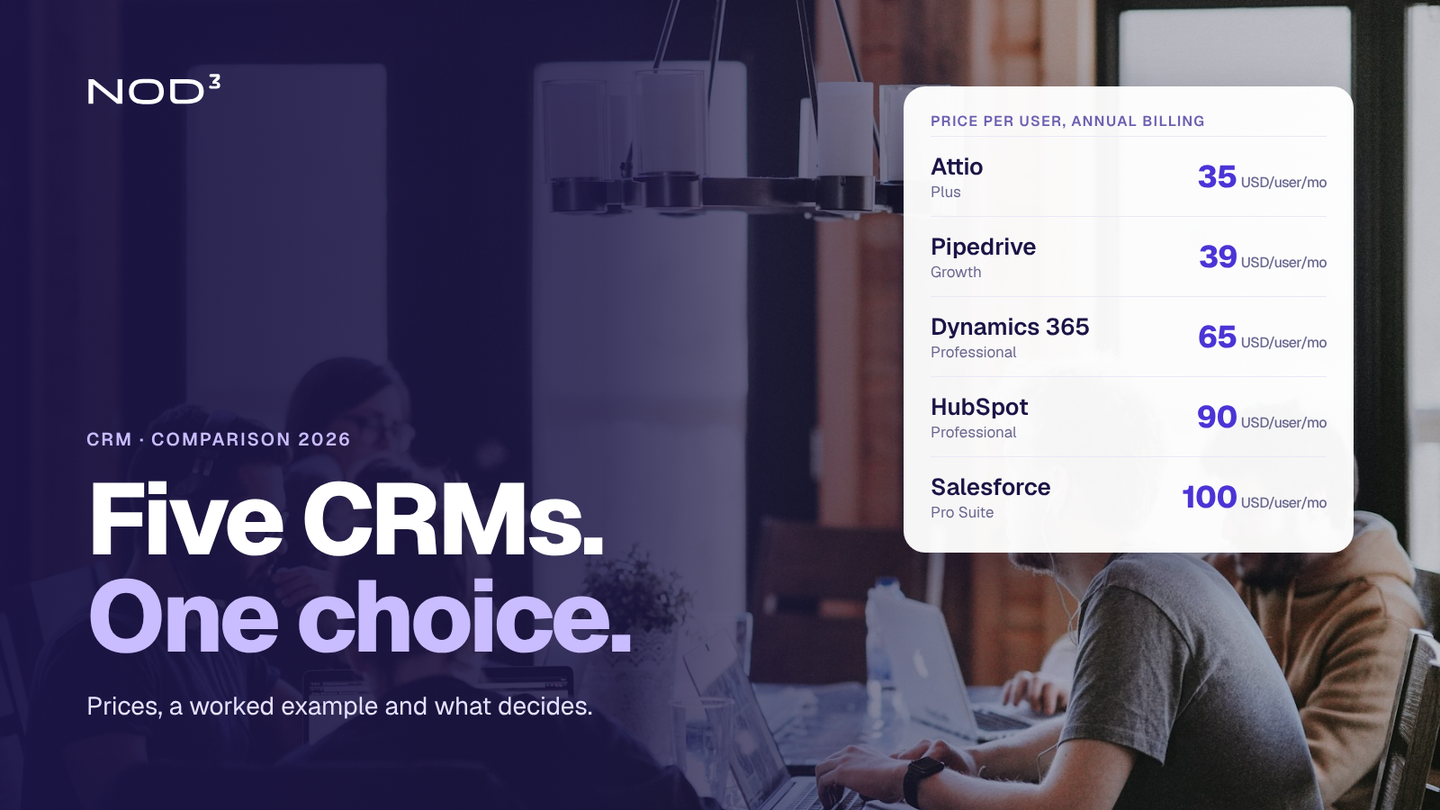
The right CRM depends on how your company sells, who will use the system and which other tools it needs to work with. Compare the cost of licences, implementation, integrations and ongoing maintenance when assessing your options.
Here we compare five CRM systems for small and medium-sized businesses. You get an overview of the plans, a worked example of licence costs for five users and questions to help you decide what fits your business.
CRM comparison: five systems side by side
Prices are per user per month, excluding VAT, taken from the vendors' own pricing pages in October 2026. The Worked example column shows the tier the chart below is based on.
| System | Free | Lowest paid tier | Worked example | Higher tiers |
|---|---|---|---|---|
| HubSpot Sales Hub (opens in a new tab) | Yes, up to 2 users | Starter 20 USD | Professional from 90 USD | Enterprise from 150 USD |
| Pipedrive (opens in a new tab) | No, 14-day trial | Lite 14 USD | Growth 39 USD | Premium 59, Ultimate 79 USD |
| Attio (opens in a new tab) | Yes, up to 3 users | Plus 35 USD (max 10 users) | Plus 35 USD | Pro 79 USD, Enterprise on request |
| Salesforce Sales Cloud (opens in a new tab) | Yes, Free Suite | Starter Suite 25 USD | Pro Suite 100 USD | Core 195, Advanced 395, Max 550 USD |
| Dynamics 365 Sales (opens in a new tab) | No, trial | Professional 65 USD | Professional 65 USD | Enterprise 105, Premium 150 USD |
In October 2026 HubSpot had a promotional Starter price (7 USD with annual billing). Pipedrive, Attio, Microsoft and Salesforce Pro Suite quote annual billing; several cost more when billed monthly, for example Attio Plus at 44 USD and HubSpot Professional at 100 USD.
The systems one by one
HubSpot is strongest when marketing and sales work in the same system: forms, email, landing pages and the sales pipeline share the same contact data. The free tier is enough to try it, but the jump from Starter to Professional is steep: from USD 20 to USD 90 per user, for every salesperson you add.
Pipedrive is built around the pipeline. It is quick to get started with and good value. It suits sales teams that mainly need to keep track of deals, less so companies that want marketing and customer service in the same tool.
Attio has a flexible data model where the company decides which objects and relationships exist. That makes it strong for companies with unusual sales processes, but someone needs to think the structure through from the start. We have written more about Attio for small and mid-sized companies.
Salesforce is the most complete and the most demanding. Starter Suite is good value, but most companies that choose Salesforce do so for the customisation in the higher tiers, and that requires both a budget and someone to run the system.
Dynamics 365 Sales is the natural choice for companies that already work in the Microsoft ecosystem: Outlook, Teams and Dynamics for finance. Outside that environment the advantage is smaller.
The right CRM is the one that fits the sales process, not the one with the longest feature list.
The cost that is not on the price list
To compare total costs, use the same number of users, time period and required features. In addition to the licence, your budget needs to cover:
Implementation: sales process, fields, pipeline stages and permissions need setting up. The more flexible the system, the more work.
Data migration: contacts, companies and deal history from Excel or the old system need cleaning and moving.
Integrations: email and calendar are usually included, but links to finance systems, web forms and support tools rarely are.
Add-ons: several vendors sell AI, calling, lead generation or extra capacity separately, such as HubSpot's (opens in a new tab) credits or Pipedrive's (opens in a new tab) add-ons.
Ownership: someone has to own the system, collect new requirements and keep the data clean.
A cheaper system nobody uses costs more than a pricier one the whole team works in.
How to choose in four steps
Map the sales process first, from first contact to invoice: which steps are there, who is involved and what information does each step need?
List the systems around the CRM: accounting, website, email, support. What has to be integrated drives the choice more than the CRM's features.
Test two systems for real: with real deals and the people who will use them, not demo data.
Calculate over three years: licences for a realistic number of users in three years, implementation, integrations and ownership.
How we work
We start from your company's process, not from a particular system, and that decides which CRM we recommend:
Mapping: sales process, data and systems today.
Shortlist and test: two systems that fit, tested with real deals.
Implementation: structure, migration and integrations, so the CRM holds real data from day one.
Training and ownership: the team uses the system, and someone is responsible for keeping it working.
Frequently asked questions
Which CRM is best for small companies?
It depends on the sales process and the surrounding systems. For a smaller sales team with a clear pipeline, Pipedrive and Attio are good value; for companies that want marketing and sales together, HubSpot is strong; and for companies in a Microsoft environment, Dynamics 365 Sales is the natural fit.
How much does a CRM system cost per month?
According to the vendors' pricing pages in October 2026, the tiers in our worked example cost between USD 35 and USD 100 per user per month with annual billing, and the lowest paid tiers start at USD 14. HubSpot and Attio have free tiers for two and three users respectively.
Is there a free CRM?
Yes. HubSpot has a free tier for up to two users, Attio for up to three, and Salesforce offers a Free Suite. They are enough to test with real data before the company pays for more users or features.
How long does it take to switch CRM?
It depends on the amount of data and the number of integrations. A simple switch for a small team can take a few weeks, while a switch with several integrations and a long deal history takes longer. Mapping things first gives a realistic plan.
Can NOD³ help choose and implement a CRM?
Yes. We map the sales process, draw up a shortlist, test with real deals and implement the chosen system with migration and integrations. The recommendation starts from the company's process, not from a particular system.
What would you like to improve?
Tell us about your situation and what you want to achieve. One of our founders will reply within two working days and help you identify a first step. The first conversation is free and there is no obligation to proceed.
What happens next?
- We review your inquiryWe read your inquiry and reply within two working days.
- We clarify the next stepWe ask follow-up questions or suggest a first conversation.
- You decide whether to proceedIf we can help, you receive a proposal for the next step with a defined scope and price.